
WIRELESS CONNECTIVITY
WiFi Adapter Dealers in Chennai
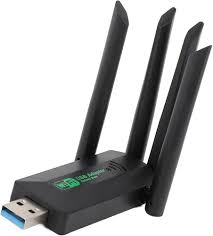
USB and PCIe Wi-Fi adapters for adding wireless connectivity to desktop and laptop computers.
Get a Free Quote →
WHAT WE SUPPLY
Wireless Adapter Dealers in Chennai
A stable internet connection is important for almost every computer, laptop, workstation, and smart device used today. But not all devices are created equal; older computers might not be compatible with the more recent Wi-Fi standards. A Wi-Fi adapter can come in handy at this point. It offers a simple addition or upgrade of wireless functionality, instead of getting rid of the entire device. With better knowledge of the variety of WiFi adapters available, our WiFi Adapter Dealers in Chennai, can assist you in picking out a suitable choice that can satisfy your gadget, network needs, connection speed and use conditions.
A WiFi adapter connects a compatible computer or device to a wireless network, helping it access the internet or other network resources without a traditional Ethernet cable. Options vary by device, operating system, ports, wireless standard and network usage.
- ✓ USB and PCIe adapter options
- ✓ AC and AX WiFi standards
- ✓ Dual-band 2.4GHz and 5GHz options
- ✓ Convenient USB connectivity
- ✓ Adapter options for compatible devices
WIRELESS NETWORKING
What Is a WiFi Adapter?
A WiFi adapter is a network device that connects a computer or other compatible device to a wireless network. It communicates with the wireless router or access point and enables the device to access the internet or other network resources without requiring a traditional Ethernet cable.
There are various designs and specs for WiFi adapters. These are readily adopted, have easy installation, and are compatible with desktops or laptops with compatible software. If a more permanent solution is needed, you can still place internal wireless devices within compatible computers. The selection will vary according to device, operating system, ports, wireless standard and network usage.
DESKTOP CONNECTIVITY
WiFi Adapters for Desktop Computers
Many desktop computers are designed primarily for wired networking and may not include built-in WiFi. It is not always possible to connect an Ethernet cable to each desktop, particularly if the router is in another room. A simple solution for connecting a compatible desktop to WiFi is to use a USB WiFi adapter. When connected and configured, the computer can connect to one of the available WiFi networks without the need for a long network cable.
This may be helpful in offices, small workstations and locations where cable installation would be difficult, as well as for home use and temporary installations. Dealers can assist customers by matching their wireless requirements and the computer's operating system to find an adapter they can select for use.
AVAILABLE OPTIONS
Different Types of WiFi Adapters
There are a number of varieties of WiFi adapters available for various uses. The features and performance vary with the model. A dealer can help determine which is suitable, rather than offering the same adapter for every need.
- ✓USB WiFi Adapters: Convenient, compact, and easy to install. They are typically used with desktop computers or other compatible technology.
- ✓Dual-Band WiFi Adapters: Depending on the model and network environment, these can support multiple frequency bands, offering flexibility when connecting to a suitable wireless network.
- ✓High-Speed WiFi Adapters: Intended for users who need improved wireless capabilities for transferring large files, online meetings, streaming and other data-intensive applications.
- ✓Internal WiFi Adapters: Installed inside compatible computers, these may suit users looking for a more permanent networking setup.
BUYING GUIDE
What to Check Before Buying a WiFi Adapter?
There are differences between WiFi adapters and computers. Before purchasing, it is important to consider a few basics to avoid compatibility problems.
- ✓Device Compatibility: Make sure the adapter works with your desktop, laptop, or other intended device.
- ✓Operating System Support: Check whether the required drivers and operating system versions are supported.
- ✓WiFi Standard: Consider the wireless standard supported by both the adapter and your existing router or access point.
- ✓Frequency Bands: Depending on the model, the adapter may support one or more WiFi frequency bands.
- ✓Connection Type: USB adapters are convenient, while internal options may be preferred for certain desktop configurations.
- ✓Usage Requirements: A basic adapter may be sufficient for normal browsing, while professional or high-bandwidth applications may require a higher-performance option.
AVAILABLE VARIANTS
Wifi Adapters Range
We supply the following variants — contact us for specifications, pricing and availability.
YOUR WIRELESS NETWORKING PARTNER
Connect Your Devices Wirelessly
Need to add WiFi to a desktop or upgrade the wireless connectivity of an existing system? Talk to trusted Wireless Adapter Dealers in Chennai for suitable products based on your device and network requirements. Contact us today to find the right WiFi adapter for your setup.
Request a Quote →